Overview
Synthesis and explanation of NetDTL diagnostics
README content
DTLexplains analyzes recent Windows event logs, groups similar events, classifies them by category, and provides clear explanations in English together with practical recommendations.
Version
Current version: v1.0-4.
Usage
python -X utf8 DTLexplains.py
python -X utf8 DTLexplains.py --days 7
python -X utf8 DTLexplains.py --logs System Application Security
python -X utf8 DTLexplains.py --html reports\report.html
python -X utf8 DTLexplains.py --json reports\report.json
Key Features
- Concise console output: summary only.
- Complete HTML report.
- Direct links to category details.
- One dedicated HTML section per category.
- Category 9: normal / common / generally harmless events.
- No external Python modules required.
What's New in v1.0-4
- Improved HTML category headers:
- HTML summary now displays the number of occurrences before the
- Simplified navigation by removing redundant numbering in the table
- Logical merge of Service Control Manager events 7000 and 7009 when
- Two representative messages are preserved when events 7000/7009 are
- Dedicated WinREAgent rule replacing the vague "read the full
- Dedicated Netwtw08 5011 rule explaining that the missing parameter
- Dedicated Windows Store / 0x80073D02 rule: the application was most
- Additional knowledge base rules: TPM-WMI, DeviceAssociationService,
Category N — Name (occurrences, groups).
number of groups.
of contents.
they describe the same startup failure.
merged.
details" message.
is internal to the driver/firmware rather than a user setting.
likely open or in use during its update and the event is generally harmless.
ESENT, Perflib, Windows Backup, Security-SPP 0x80070070.
Output
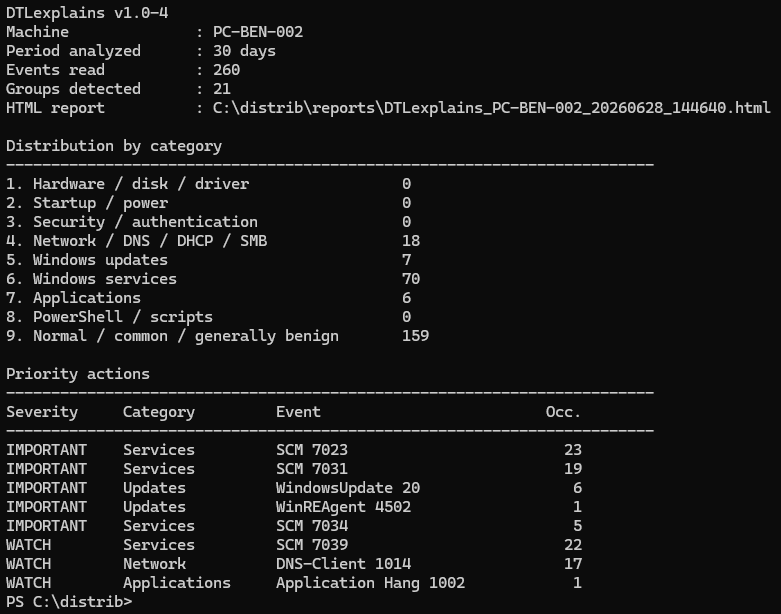
By default, the HTML report is created in:
reports\DTLexplains_<computer>_<date>.htmlAn optional JSON report can also be generated using --json.
Notes
Reading the Security log usually requires an elevated (Administrator) console.