Documentation
Posted: Sun Jul 19, 2026 2:50 pm
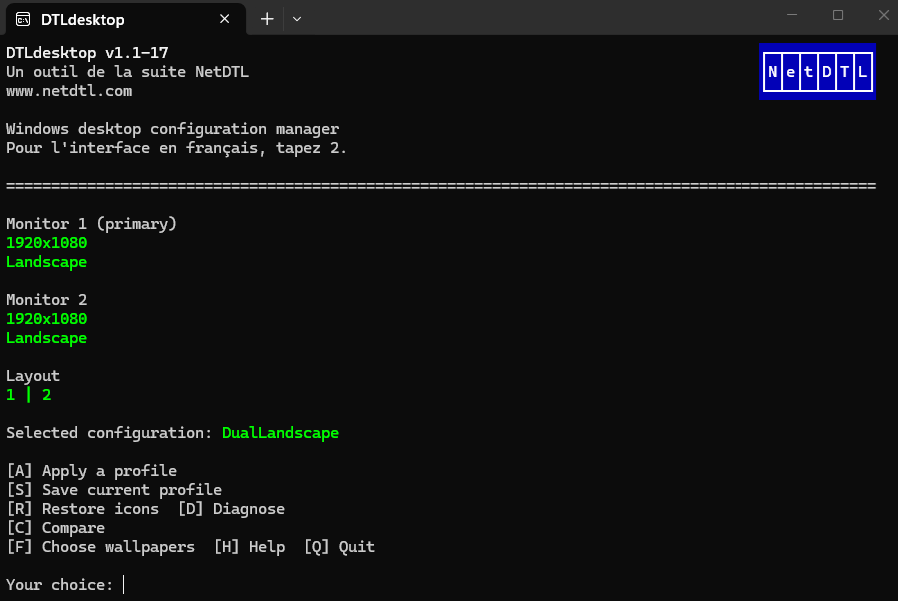
DTLdesktop saves, compares, and restores a complete Windows desktop state for each monitor configuration in a dual configuration..
It records monitor layout and orientation, the wallpaper assigned to each monitor, and every desktop icon position. When a known configuration is detected again, DTLdesktop can restore the entire environment in one controlled operation.
Why DTLdesktop?
Windows can move icons, swap monitor identities, or keep a badly cropped wallpaper after a rotation, a monitor change, a projector connection, or a move between office and remote work. DTLdesktop recognizes the actual monitor geometry and quickly restores a reliable layout.
See:
https://netdtl.com/doc/DTLdesktop_Reference_Manual.html
https://netdtl.com/doc/DTLdesktop_User_Guide.html
https://netdtl.com/doc/DTLdesktop_Manue ... rence.html
https://netdtl.com/doc/DTLdesktop_Guide ... ateur.html
Repo: https://github.com/DidierMorandi/DTLdesktop
It records monitor layout and orientation, the wallpaper assigned to each monitor, and every desktop icon position. When a known configuration is detected again, DTLdesktop can restore the entire environment in one controlled operation.
Why DTLdesktop?
Windows can move icons, swap monitor identities, or keep a badly cropped wallpaper after a rotation, a monitor change, a projector connection, or a move between office and remote work. DTLdesktop recognizes the actual monitor geometry and quickly restores a reliable layout.
See:
https://netdtl.com/doc/DTLdesktop_Reference_Manual.html
https://netdtl.com/doc/DTLdesktop_User_Guide.html
https://netdtl.com/doc/DTLdesktop_Manue ... rence.html
https://netdtl.com/doc/DTLdesktop_Guide ... ateur.html
Repo: https://github.com/DidierMorandi/DTLdesktop